Monday, October 02, 2006
BPM and SOA conference - Day 0


Thursday, September 28, 2006
BizTalk on Virtual Server
Let us say your organization A has 2 SQL Servers and 2 BizTalk servers. So that means you would have 4 Windows licenses to run those servers. I am assuming BizTalk and SQL are not on the same server.
Your present scenario is
BTS - 2
SQL - 2
WIN - 4
Now consider a virtualization scenario where you have a single Quad proc machine.
Now let us consider this has 4 virtual processors and 2 of them runs BizTalk, 2 of them runs SQL
Now in the old licensing model you need to pay license per processor that would mean you need to have
BTS - 4
SQL - 4
WIN - 4
Effectively by virtualization the license cost went up. But with the new windows licensing model you pay only if the virtual processor runs the Server, In our example that would mean
BTS - 2 ( as it is running only on 2 virtual processors )
SQL - 2
WIN - 4
So effectively your BizTalk and SQL licensing costs have not changed by virtualization but your actual hardware and annual support cost will be driven down considerably and you can take other advantages of virtualization. Let us say you want to emulate 6 virtual processors using your Quad proc machine and run 4 BTS and 2 SQL servers you can do that without buying any extra hardware by paying only the additional BizTalk server licensing cost . In this case
BTS- 4
SQL -2
WIN - 6
So as I said before virtualization does bring down support cost but not always software costs. But there are other software’s which are still using the physical processor based licensing. In that case you will have licensing benefits when you run more virtual processors than the actual processors and pay more when you have lesser virtual processors running your application.
Friday, September 15, 2006
BizTalk Server Goodies
Monday, August 14, 2006
Speaking at CNUG- DAM
The topic for the talk is
"Common Enterprise Integration problems,
Design Patterns and Solutions using BizTalk "
Brief Agenda
Talk about some common problems faced in EAI world and how biztalk can be used to
address those effectively. Will be some scenario problems and design ,Splitter, Enricher , Aggregator , Normalizer,Different Convoy
Discuss one or scenarios with a demo ( Aggregation ) .
The problem of zombies
Q & A
The session is scheduled on 21 August - Monday between 7.00 p.m. to 9.00 p.m. in Sangeetha Residency.
Friday, July 21, 2006
Multiple Schemas in Custom Pipelines
For eg let us you have a situation wher you have multiple flat files coming in and you need to find the schema . So normally we will put a flat file Dissasembler in and create a custom recive pipeline and we will need to create 3 pipelines.

In 2006 what you can do is have multiple flat file dissasembler components in the Dissassemble stage . So now your 3 pipelines now becomes one pipeline. All you need to for this is to go to your pipeline and drag in the 2 or 3 flatfile dissasembelrs and set the schema property to the ones you want and then voila. You wil notice that in the the Dissasemble stage property the execution mode appears as "First Match" .
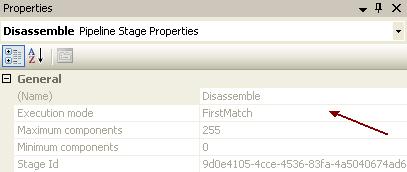
But dont add too many dissasemblers in one stage . This wil have a negative imapct in performence . This is because probing for every dissasembler components degrades the perf.
In such a scenario consider implementing a Schema Resolver component
Thursday, July 20, 2006
Visual Studio 2005 and Visual Source Safe
I ran setup again chose Add Remove and could not find the installtion Option.
Anyway after a few painful hours I have finally got it to work . This is what I had to do
1. ) Get the VS 2005 CD . Browse to the VSS folder and run Setup .
2. ) You need the first check box in the custom installtion . Everything else is really optional
3.) Install the Visual Source safe client and connect to your existing Sourcesafe Manully
4.) Fire up Studio, and go to Tools > Options > Source Control> Show all settings > Select the current source control plug-in to "Microsoft Visual SourceSafe"
Well I hope that helps some of you atleast ! If it did leave me a note !
Friday, July 07, 2006
Understanding BizTalk Management Databases ( BiztalkMgmtDB)
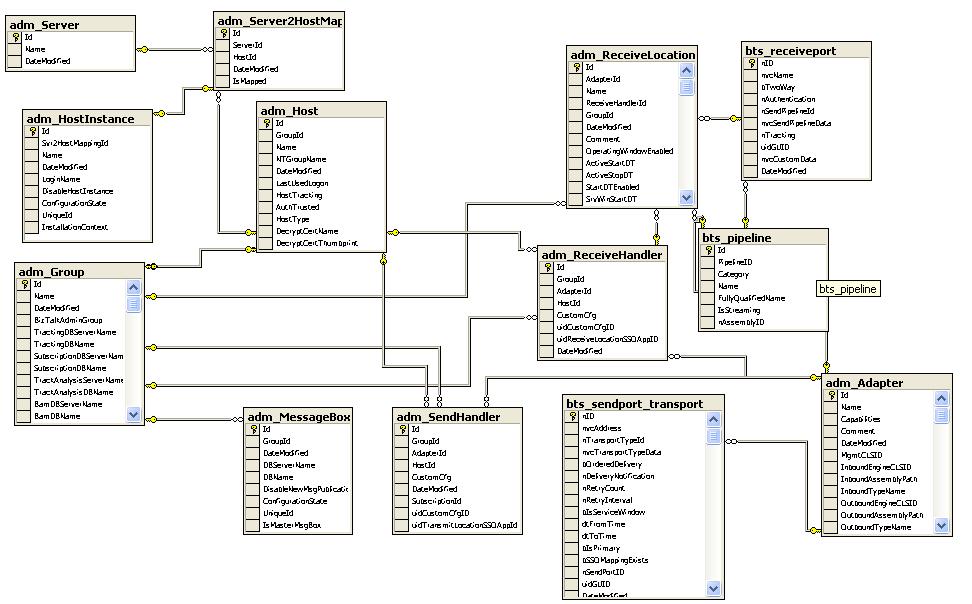
Part 1 Servers Hosts and Processes
First is the Table adm_Group which contains information about BizTalk Groups. They contain information like cache frequency, the large message ,threshold bytes and certificate thumb print. This is in a way the logical top table.
Second is the adm_Host table. This table contain information about the hosts like Inproc or isolated . The thread pool size, message delivery and certificate thumbprint if configured for signing messages . Maximum delay .
This table is connected to the adm_HostInstance table .This table has info about the
host instance ( BTS Service ) running within the hosts. You can also see under what accounts the host Processes are configured to run under here . Each host has several sub services specified in the adm_HostIntance_SubServices. These are services like Caching , EPM , XLANG engine
The host are configured on th server and this enlistment is captured in the the adm_Server2HostMapping . This essentially connects the adm_hostinstance and the adm_Server .The adm_Server contains the list of servers that are members of that Biztalk group
A brief note on adm_ServiceClass is needed here as this table controls the value of the high and
low watermarks for memory , file . This setting should not be manually edited , There is a a tool
for editing these value and should have a pretty strong reason to edit these .
The adm_MessageBox table contains the messagebox entries associated with this host . You can scale biztalk by increasing the message box first vertically and then horizontally even in those situations it is recommended to go from 1 to 3 and not to 2 to see increase in performance.
Part 2 : Adapters , Recieve Ports , Send handlers ,pipelines
The next main table is the adm_Adapter , This table contains all the adapters installed for Biztalk like FTP, HTTP, EDI, File,MQ Series, MSMQ,SOAP, SQL, POP3, SMTP and WSS.
The adm_RecieveHandler table contains key to the process identification guid in the registry/DB .The adm_SendHandler is the same for the Send Process.
When we create a Recive port and a Recieve Location . The adm_ReceiveLocation will contain the entry for the port location and will have tha adapterId value corresponding to the transport type in the adm_adapter table. This will also have an entry into the bts_recieveport table which has the containing port information . similary bts_sendport contains the send port information .
In general bts_ prefix stands for the corresponding biztalk artifacts ;bts_assembly contains the deployed assemblies the bts_orchestration contains the orchestrations other tables like bts_orchestration_port,bts_pipeline follow similar pattern
In general the prefix gives you some idea about the table
- ADM_ are administration tables
- BAM_ ,BAS_ BAM or BAS specific tables
- TDDS_ Tracking tables
- BTS_ Biztalk artifacts tables
- BT_ App specific tables
- BIZTALK General tables
Hope that was informative .
Monday, June 12, 2006
Biztalk 2006 R2 TAP nominations Open
Features in brief are
- Microsoft EDI Solution for BizTalk 2006
- Microsoft RFID
- BizTalk Adapter for Windows Communication Foundation (WCF)
- WinFX Adapter Framework
- WinFX Line of Business (LOB) Adapters
- BAM interceptors for Windows Workflow Foundation (WF) and WCF
To sign up for TAP , Go to the Microsoft Connect Site .
Monday, May 22, 2006
Biztalk 2004 Load Generation Tool
Errr 1904.Module C:\Program Files\LoadGen\ComFileMonitor.dll failed to register
After being stumped for a while I went and looked at System Requirements
- Microsoft .NET Framework 2.0
I wonder if they have a version of the tool built on 1.1 as most Biztalk 2004 Developers would have 1.1 on the box . Hopefully I can get a 2.0 box configured and test our 2004 box
Thursday, April 20, 2006
Biztalk Server Best Practices Analyzer
This could be stuff like your Biztalk purgejobs are not running .This could seriously slow you down after some time. Or your Master secret server is not backed up .
There is some good posting and screenshots in Richard's Blog.
Tuesday, April 04, 2006
Failed to Create SQL Login for Biztalk Administrators Group
You get the above message and you are already logged on as the user who has full permission to the SQL Server group . We got this error when we were configuring a new server in our production environement . I had faced this problem before but I had forgotten the solution . So I blog it here so that any lost souls get the benefit . This is a know problem when configuring Biztalk in a multiple computer configuration . You need to enable network client access DTC before you start configuration or your configuration WILL FAIL !!
This is documented in MSDN Biztalk trouble shooting section .
Multiple computer configuration using Windows Server 2003 or Windows XP
Problem: If you attempt to run the Configuration Wizard on Windows Server 2003, or Windows XP, and point to a remote SQL server, the configuration will fail.
Resolution: You must enable network clients DTC access before configuring BizTalk Server. This is required for the distributed transactions performed by BizTalk Server components to work.
Important The following procedure must be run on each of the computers in the multiple computer configuration.
To turn on DTC Access
From the Start menu, double-click Control Panel, double-click Administrative Tools, and then double-click Component Services.
Expand Component Services, and then expand Computers.
Right-click the computer you need to set, and from the context menu select Properties.
In the Properties window, select the MSDTC tab.
In the Transaction Configuration area, click Security Configuration.
In the Security Settings area, select the Network DTC Access check box.
In the Security Settings area, check the Network Clients check box.
Click OK on each open dialog box.
Restart your computer to enable the remote DTC option.
Warning This configuration could take up to 15 minutes.
Hope that gets you back on track .. Leave me a comment in any case
Friday, March 24, 2006
Biztalk 2006 hits RTM
Wednesday, March 08, 2006
Biztalk Property Schema issue when Deploying
When we tried to deploy the schema , We came across this error and had to spend some time trying to debug this one.
The error you get would be a variation of the one below
Property "ns0:Your_Promoted_Property" (msgType="YourSchema#RootNode") not found in Configuration database.
Quick Solution
Delete the Node which it is complaining from the property schema and recreate it again
Reasoning
What was odd on our case was this same DLL was deploying in vertain machine but not on some other ones.
After aome amount of gogling I tried to think about the error for some time and this was my line of reasoning . The deployment was complaining about a promoted property not available in the configuration database . This was a bit weird because the property that Biztalk was complaining about was contained in the same Assembly.
But once I realized that somewhere in the deployment process the properties that were being promoted were first stored into SQL tables for eventual usage in CBR scenario . I realized that this insertion would be failing . The only reason this could be failing is if the variable already existed.
Since Biztalk being a Globalized product I figured the names would not be used as it is but rather some unique value a Identity or GUID . So I went ahead and changed the guid value of all the properties that it was complaining , I had edited the XML for this values . (You can delete and recreate the Node if you are not comfortable ) .
Then I rebuilt and it deployed like a charm !
PS: What had happened is one of our Dev's had copied the property schema from another project and changed the namespace and the field name of certain fileds.
This worked on certain machines without problems because these devemachines did not have the solution from which the property schema was copied deployed on them . Wheras we had this prior solution deployed on our servers.
So I guess Copy-Paste fanatics take care. !
Wednesday, February 22, 2006
Biztalk Podcasts
Scott answers lot of intersting question here .. Like how did he become product manager of Latinum (Biztalk 2000).
While on code names these are the list so far..
Latinum --- BizTalk 2000
Bizet --- BizTalk 2002
Voyager --- BizTalk 2004
Pathfinder --- Biztalk 2006
Avalon --- Windows WorkFlow Foundation(WF)
??? --- Biztalk 2008
Now that Biztalk Server 2006 is out there and after having seen the demo of Windows Workflow Foundation (WF ) at PDC lot of us are asking what will be future of Biztalk Server 2008 ? .
Scott speaks out that the design surface of workflow for WF and BTS was built by the same team and the similarities end there Biztalk would still be needed to solve problmes of EAI, BPM ,B2B, Adaptor management .
Scott also mentions that the workflow for Biztalk 2008 would most probanly share the workflow piece with WF and there would be a upgrade to current customers. This also make me believer the news I heard about the Biztalk and Indigo Team got merged into one group .
Listen to the Biztalk Server Podcasts... here
Monday, February 06, 2006
PublishMessageException - A batch item failed persistence
You get the Error below
--------------------------------------------------------
Event Type: Error
Event Source: XLANG/s
Event Category: None
Event ID: 10034
Description:
Uncaught exception terminated service Biztalk.Reusable.FileMover.FileMoveOrch(edf0c1f0-c242-60c9-5b56-41ab42b9ee5d), instance e756bd88-5966-48f9-be40-8a55451d2bf4
Exception occurred when persisting state to the database.
Exception type: PersistenceException
Source: Microsoft.XLANGs.BizTalk.Engine
Target Site: Void Commit()
Help Link:
Additional error information:
A batch item failed persistence Item-ID f64a095a-eed6-451c-86ee-9aac941b935b OperationType MAIO_CommitBatch Status -1061151998 ErrorInfo The published message could not be routed because no subscribers were found. Please use the Health and Activity Monitoring (HAT) tool to diagnose this situation. .
--------------------------------------------------------
There are a couple of things you should check
1.) Is the Orchestration and all corresponding objects send ports started
2.) Is Biztalk 2004 Service Pack Installed
3.) Is your Orchestration Calling another Orchestration whihc is not started
4.) Are you using Dynamic Send Ports , If yes are you setting the Address location
Microsoft.XLANGs.BaseTypes.Address properly
In the problem I was debugging, the value of this variable was set from an external call to a .net function and this value was not properly intitalized.
Fixing the function and regacing solved the issue.
Thursday, January 12, 2006
Biztalk Password Resets
THIS information Applies if you have NOT backed up your master secret
( Thanks Patrick for pointing out this ) .
if you have in C:\Program Files\Common Files\Enterprise Single Sign-On
>ssoconfig.exe -restoresecret YouBTSSSOBackupfile
So one day you reset that password and suddenly you discover that your biztalk service is not running.
First - Dont Panic !
ok Now you are not panicking :-)
so these are the places you need to reset
Goto ->Start->Run-> Services.msc
and update the password for the following
BizTalk Base EDI service
BiztalkServer Application
Enterprise Single Sign-On Service
MSSQLSERVER
Rule Engine Update Service
SQLSERVERAGENT
Next Open Biztalk Administrator and change passwords for
BizTalk Host Instance Account
BizTalk Isolated Host Instance Account ( In case you set it up same which is not the recommendation btw )
Next Open IIS Manager
Goto ->Start->Run-> inetmgr.msc ->Application pools->Properties ->Identities
and change the password for all the onee below ( You might not have some based on your configuration )
HwsMessagesAppPool
HwsWSAppPool
StsAdminAppPool
STSWebServiceAppPool
TpmWSAppPool (If you are using BAS)
WSSAppPool (Sharepoint app Pool )
BAMAppPool
Whew !! That should get you back on track .
In case it did not leave me a comment or Ping me !
Tuesday, January 03, 2006
Loading Dynamic Maps in Biztalk Orchestrations
Inside the expression shape /Message Assignment Shape
objMapType = System.Type.GetType("Map Name ,( Full strong Name of Assembly)");
construct Output_Xml
{
transform (Output_Xml) = objMapType (Input_Xml);
}
Thursday, December 29, 2005
Error while calling Orchestration Exposed as Webservice
The Messaging Engine failed to register the adapter for "SOAP" for the receive location "/VirtDir/App.asmx". Please verify that the receive location is valid, and that the isolated adapter runs under an account that has access to the BizTalk databases.
An attempt to connect to "BizTalkMgmtDb" SQL Server database on server "Server" failed with error: "Cannot open database requested in login 'BizTalkMgmtDb'. Login fails.".
The "SOAP" adapter is suspending an outbound message going to destination URL
1 ) This issue occurs because the App pool identity that is used by the application pool for the exposed Web service is not added as to the BizTalk Isolated Host Users group. This is needed because the message needs to get properly authenticated to get submitted.
2 ) Also this account needs permission to the %systemroot%\Temp folder on the server that exposes the Web service .This is needed as the web service (.asmx) files are JIT compiled to create DLLs in the %systemroot%\Temp folder.
Giving these correct access and permissions should solve the issue .
Friday, November 04, 2005
BTS 2006 MSI Issues
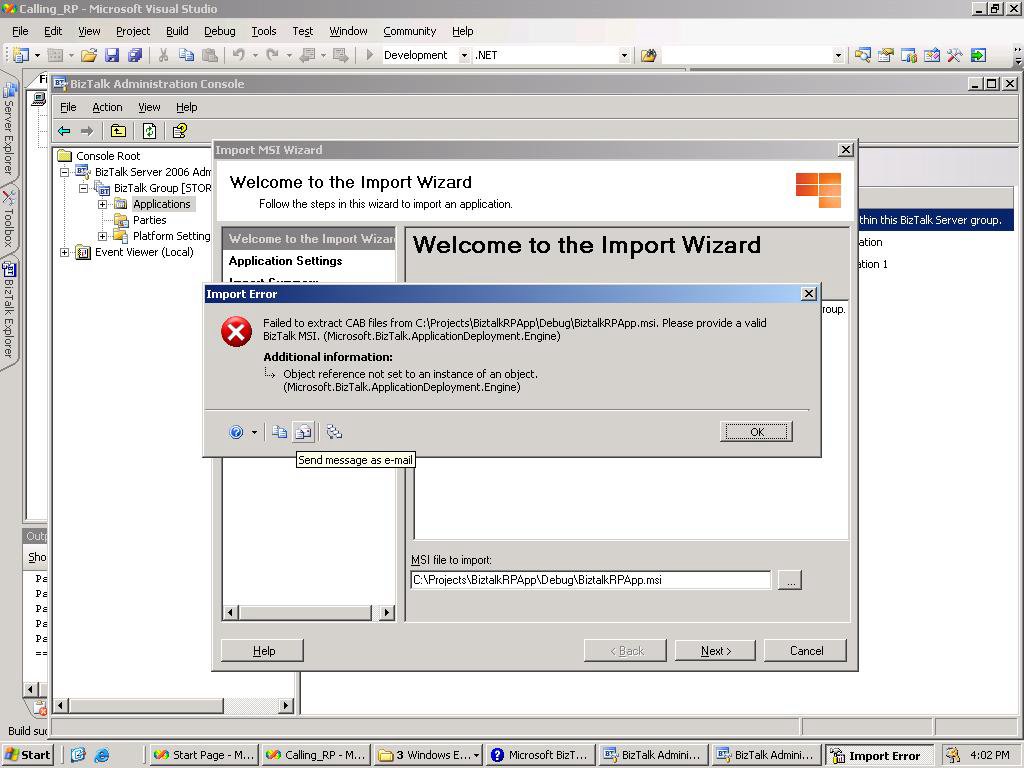
I have built a Biztalk 2006 Project and I added a Setup project and added the output of the Biztalk project, but when I try to import the MSI that I created using the Biztalk administration console. I get an error saying this is not a valid Biztalk MSI ?
Has anybody encountered this error ?
PS : But if I export a already deployed application as an MSI , I am able to import it into anothe BTS2006 VPC machine. So does Biztalk not support the Windows MSI Setup route ?
Calling receive Pipelines from Inside orchestrations BTS2006
You can enumerate through the EnvelopeMessage passed into the recieve pipeline just like you would enumerate in an ICollection or Recordset using .MoveNext()
This is how my built Orchestration looked like
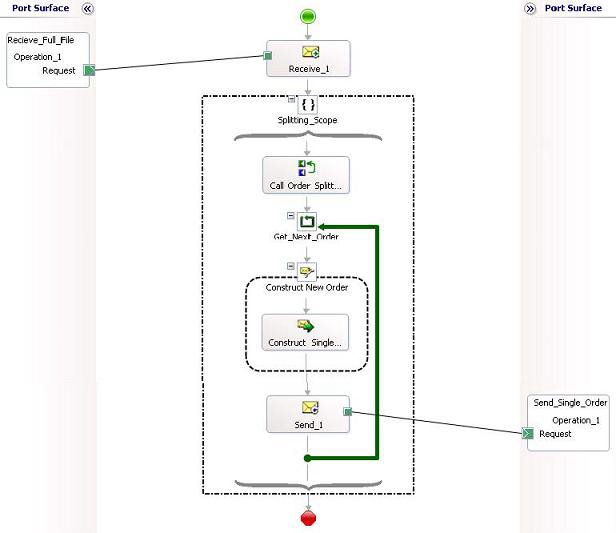
I will briefly try to capture the steps that I took
1.) Create a Document Schema SingleOrder.xsd
2.) Create an Envelope Schema TotalOrder.xsd
3.) Create a receive Pipeline SplitOrder.btp
4.) Add the XML Dissasembler and select the Document and envelope Schemas as above.
5.) Create your Recieve Port and set the document type to your Envelope Schema , This Port now has XMLPassthru transmit , I am calling this message IncomingFullMessage
6.) Now we enter Splitting scope ( Pipelines can only be invoked from Atomic scopes, Also it does not support Recoverable interchange processing when called this way )
7.) Add Microsoft.XLANGs.Pipeline as Reference and then ;declare a variable for the pipeline in my case
OrderSplitter AS "Microsoft.XLANGs.Pipeline.ReceivePipelineOutputMessages"
8) In the expression Shape Call Order Splitter ,
OrderSplitter = Microsoft.XLANGs.Pipeline.XLANGPipelineManager.ExecuteReceivePipeline(typeof(SplitOrderReceivePipeline),IncomingFullMessage);
9) In the loop Get_Next-Order Shape iterate through each message using
OrderSplitter.MoveNext()
10.) Create an Orchestration variable "SingleOrder" of type Document Schema
11.) Create the Single Message you want in the message assignment Shape and set
SingleOrder = new System.Xml.XmlDocument();
OrderSplitter.GetCurrent(SingleOrder);
12) Now you have the single Message that you want to process. You can send it to whatever process you want , In this example I am just sending the message to a Output folder.