Wednesday, June 08, 2005

Biztalk FlatFile Disassembler Processing behavior

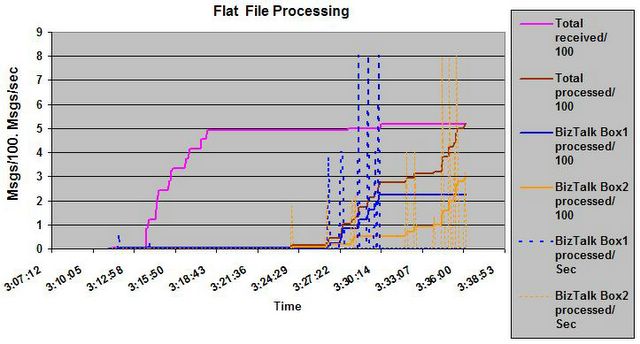
Recently I had a scenario which involves processing a large amount of flat files; each of whihc went througha Flatfile Dissasembler before the business processing on that started. Here I record some points of interest of FFDASM behaviour. When FlatFile Disassembler is fed with a large amount of files biztalk waits for all files to unpack before it starts processing.

Our test environment had two boxes each both of which configured under the same host and having identical machine config with SQL on a seperate box was used for the test
For our Scenario we had little over 500 files being dropped simultaneously .The file batch size was set at 20 the default.. It was noticed that after picking up the first 20 and initiating disassembling this batch before the next set is picked up , it goes on picks up all the files.( See graph)

Essentially Biztalk seemed to wait for all the messages to get picked up and then flat file disassembler unpacks all of the flat files from the interchange before it starts processing. This is evident from the apparent lack of activity form the time the last file was picked up and when the first set of files started coming out ( See Graph) . I had seen this in one of prior instance and I recently ran some test and got similar results which made me write this post.


Biztalk Flat File Dissasembler Behaviour  

Path Finder , Yukon and Whidbey

After a long wait and amongst lot of confusion on Whidbey not releasing in 2005 , Now it seems all the three VisualStudio 2005 , SQL Server 2005 and Biztalk Server 2006 is all going to come out in the Week of November 7. This was announced at TechED 2005

Also the Community Tech Preview (CTP) editions are out for BTS 2006.

Friday, May 20, 2005

Biztalk and File Masks Bug /Feature ?

Recently I was debugging a Biztalk solution with a friend of mine Rajesh ,and we noticed a curious Masking issue with BizTalk

Suppose you give a mask

*.XML

Which of these files are picked up ?

A) Orders.xml
B) Orders.XMLTEST
C) Orders.XML.BAK
D) Orders.TXT
E) ORDERS.XMLINFO
F) ORDERS.XML_BACKUP

I am sure your answer is only A , but in reality Biztalk picks up all files except C and D for a mask *.xml

So instead of looking for a file which starts with * and ending with .xml,It seems Biztalk picks up any file which has wild character starts and has .xml in the name not necessarily ending

But the contradiction to that is if there is one more DOT [.] Case C which is not picked up

So the way the mask gets applied is wild character then matches the last Dot and then matches charecters followwing the dot

Is this an intended behaviour or Bug ?

Thursday, May 12, 2005

Error Lookup Tool for BizTalk

You can lookup your Biztalk Error codes using this tool ,You can look at this tool from inside VS.NET .

Download it form Got Dot Net here

Once you unzip the tool . You can open up your VStudio->Tools ->ExternalTools and Add this Exe and give a descriptive name like "Biztalk Error Code Lookup"
So next time you get an Error , It is right there

Wednesday, May 11, 2005

Separate Host For Tracking

A recommended Biztalk best practice for performance is to have a separate Tracking Host . So when you add a separate Tracking host , you might encounter this scenario


Event Type: Error
Event Source: BAM EventBus Service
Event Category: None
Event ID: 25
Date: 5/7/2005
Time: 1:53:25 AM
User: N/A
Computer: BiztalkProd1
Description:
Either another TDDS is processing the same data or there is an orphaned session in SQL server holding TDDS lock.EXECUTE permission denied on object 'TDDS_Lock', database 'BizTalkDTADb', owner 'dbo'. SQLServer: mysql, Database: BizTalkDTADb.


Soln: This means that your one of your Hosts other than the Tracking Host has the Host Tracking property Checked . Uncheck this and you should be all set

Friday, May 06, 2005

SEHException While Enlisting Orchestration

I am posting one of the errors we encountered over which considerable time was spent debugging.

You will get the below Error in Event Log


Event Type: Error
Event Source: XLANG/s
Event Category: None
Event ID: 0
Date: 5/5/2005
Time: 3:22:32 PM
User: N/A
Computer: Machine12

Description:
An SEHException exception occurred while the XLANG/s runtime enlisted a service.
Error message:External component has thrown an exception.
Call stack: at Microsoft.BizTalk.MetaDataOM. ICLRType.GetFields(UInt32 dwBindingFlags) at Microsoft.BizTalk.XLANGs.BTXEngine. BTXServiceStaticState._createStringLookup(String svcFullTypeName,
IAssemblyManager asmMgr) at Microsoft.BizTalk. XLANGs.BTXEngine.BTXServiceStaticState. PersistState (String mgmtDBServer, String mgmtDBName, String MsgBoxGroupName, String ApplicationName, String serviceAssembly, String serviceTypeName, Guid[] PortIDs, Guid[] LrpIDs, ITransaction transaction)
at Microsoft.BizTalk.XLANGs. BTXEngine. BTXService.GoLive (String configDBServer, String configDBName, String msgBoxGroupName, String applicationName, String servicePath, String serviceTypeName, Guid[] portIDs, Guid[] lrpIDs, ITransaction transaction)

Exception type: BTXEnlistmentException
Source:
Target Site:
Help Link:
Additional error information:

External component has thrown an exception.

Exception type: SEHException
Source: Microsoft.XLANGs.BizTalk.Engine
Target Site: System.Collections.IEnumerator GetFields(UInt32)
Help Link:
Additional error information:


This normally occurs when you don't have a dependent file of the assembly not in GAC . That is an orchestration which references other Dll's must have the dependencies already GAC'd

Another variation of this enlistment error is OutOfMemory exception which is due to some limitation of WMI , which can be increased with a custom Script


But in our case this was not the case I checked and rechecked the dependencies of our project they were all there .

What we found out was that our Production server did not have Biztalk SP1 applied whereas the dev machine had SP1.

So apparently the issue is still I guess of DLL's Missing in GAC but not of the application but that of Biztalk Later version Assemblies !!

Friday, April 29, 2005

Biztalk Subscription

I have often been asked What is the big difference between Biztalk 2002 and 2004 , There are a lot to be frank But if I have to pick one , It will be the much better and unified subscribtion mechanism . If you want to learn more about Biztalk subscribtion Charles Young's Blog Post is a good start

Wednesday, April 27, 2005

BizTalk Zombies and more..

You have got this error from biztalk "Completed with discarded messages" and are wondering what that means you could be potentially seeing what in BTS buzz world is called a Zombie . A Zombie is usually a valid message or a response that is left without a subscription to process at that point in time . Though this one liner definition is quite crude explanation . If you are dealing with scenarios like Sequential convoys and batching you are likely to witness this especially when you have large amount of transactions and when your system is operating near to high load conditions ( that is when I have witnessed it the most, though there are scenarios for encountering zombies even under little or No load ) .


If you really want to learn more about Zombies read this Blog from Biztalk Core Engine Team


Now If your solution involves a while loop surrounding a listen with one branch having a receive and the other having a delay shape followed by some expression shape that sets the loop counter and controls the loop termination .You would more than likely see this scenario as delay could be triggered and the message could be delivered after.

Now the condition for delay and time out is we don't want to wait for a message forever . So we timeout after an interval (Tn) but this (Tn) is non-deterministic and is usually set to a small number.


For an app that we had increasing the delay from 10 Secs to 2 minutes( chosen at random)
did away with Zombie occurrences . I would also suggest decreasing the default retry of 5 minutes to a lesser value if you are in a aggregated scenario where you are collecting one message at a time. 2 minute looks like a large interval to wait for one message but keep in mind that this delay is not arithmetic and does not occur for each listen . Most often the message is already there to be consumed and this delay happens ONLY when there is no message to consume. In a stressed Biztalk box our scenario which is an EOD movement had given us a liberty of waiting an extra couple of minutes.


Another solution that works is after the loop is over to have another loop with the same correlation set(following) to drain these instances for a certain amount of time ( DRAINING ). You can do this before or after you send out the final message . in the latter case you can send these drained ones as a second message or log them as errors .

Also a WMI event is generated for a Zombie occurrence , I haven't hit across the details of the same .

Thursday, April 07, 2005

Middleware Mantra - Contract First

When you are designing large middleware integeration efforts , it is quite easy to get into code first integerate later but From classic COM to Biztalk integeration it is always Contract First. Be it an IDL or a Schema . This is generally considered the best way to approch service design. The approach is to design schemas first then generate code from that.

More on Contract First approach ..
http://www.thinktecture.com/


http://www.iona.com/blogs/vinoski


Meanwhile I heard MS is planning to drop support for IDL . Remeber those good old COM days where you could cleanly differntiate the interface from the implementation
Sign the pettition to save IDL here

Thursday, March 31, 2005

Choosing between Distinguished vs. Promoted Properties

In Biztalk you can promote a property as either distinguished or promoted properties. Choosing what to use is tricky

Distinguished fields

In general use Distinguished fields if you want to just use them in Orchestration

Summary

- No restriction on field length

- No participation in Routing

- No seperate property Schema

- Not accesible by std pipeline components
( workaround exists in cutom pipeline components “http://schemas.microsoft.com/BizTalk/2003/btsDistinguishedFields” namespace using XPath on their name

Promoted Properties

These are generally used with Routing

Summary

- Used in publish and subscribe in the Msgbox

- Field Restictions ( 255)

- Seperate Property schema

- Restricted in the XSD types support compared to distinguished properties

ThumbRule

Use Distinguish properties as they are lightweight unless you need them for any special stuff like Routing ,Tracking ,Correlation or custom pipeline behaviour

Wednesday, March 30, 2005

Biztalk 2004 Naming Conventions

I have been looking around for a good Set of Biztalk naming conventions and I came acros this from Scott .

Biztalk 2004 Naming Conventions

Unconstructed Message even when Constucted

Ok you get this

use of unconstructed message "Message Name" .

1) This means what the error message says you are using an unconstucted message in a send shape without creating it

2) You have indeed constucted the message - Biztalk still complains . Do you have parallel actions in your orchestration . Is it possible that you are using the message whihc was consturcted in a parallel shape and being used outside it. Now Aren't you glad Biztalk complained !

Monday, March 28, 2005

BTS 2004 Flat File Issues

There are lot of inherent nittygrittys and hack that you need to know when you have Flatfiles with Records and the root node both being ended by CRLF's

I did look around quite a bit before I finally came across this link

Flat file Schema Tutorial 1

Flat file Schema Tutorial 2

and Oh ! to prevent empty nodes from not occuting you need to set Suppres Empty Nodes property to TRUE

Tuesday, March 22, 2005

Biztalk Explorer Extension

Wouldnt it be nice to click a DLL and see it's internal schemas and objects contained in a Biztalk DLL , IF you have used ildasm for .net asemblies you know what I am talking about . There is a feature in Biztalk for that , YOu ned to register that dll to get the view in your explorer


The extension is the BtsAsmExt.dll and is located in the \Program Files\Microsoft BizTalk Server 2004\Developer Tools subdirectory.
To enable this functionality
regsvr32 "C:\Program Files\Microsoft BizTalk Server 2004\Developer Tools\BtsAsmExt.dll"

You will see the BizTalk Server Assemblies icon in Windows Explorer alongside the drive letters.


When you click on the BizTalk Server Assemblies you will a list of all of the deployed assemblies. You can then click on each of the assemblies and you will see the BizTalk artifacts that are used in that specific assembly. These includes Orchestrations, Schemas, Maps and Pipelines. In addition, if you double click on an individual artifact, the Type Content Viewer windows pops up and will show you an XML representation.


This tool also includes additional functionality. It adds a BizTalk Server Search pane (found under the View ->Explorer Bar->BizTalk Server Search) which lets you search across the deployed assemblies for any of the BizTalk types. So, I could do a search for any schemas that are referenced by pipelines across all assemblies or Correlation Types referenced by Orchestrations found in assembly X.

Tuesday, March 15, 2005

Monitoring Biztalk performance

Biztalk applications have now become matured enough and are now getting scrutinized for performance. Often this scrutinizing of results in capturing some key performance counters and you will eventually chose a set of counters to measure and run your tests. But often on later analysis you realize that you missed capturing certain key counters . So what is a good subset to be captured. The counters below offers a good start as any

Biztalk Box General

\\BTSBOX\.NET CLR Exceptions(_Global_)\*
\\BTSBOX\.NET CLR Memory(_Global_)\# Bytes in all Heaps
\\BTSBOX\.NET CLR Memory(_Global_)\# GC Handles
\\BTSBOX\.NET CLR Memory(_Global_)\# Gen 0 Collections
\\BTSBOX\.NET CLR Memory(_Global_)\# Gen 1 Collections
\\BTSBOX\.NET CLR Memory(_Global_)\# Gen 2 Collections
\\BTSBOX\.NET CLR Memory(_Global_)\# Total committed Bytes
\\BTSBOX\.NET CLR Memory(_Global_)\# Total reserved Bytes
\\BTSBOX\.NET CLR Memory(_Global_)\% Time in GC
\\BTSBOX\.NET CLR Memory(_Global_)\Allocated Bytes/sec
\\BTSBOX\.NET CLR Memory(_Global_)\Gen 0 heap size
\\BTSBOX\.NET CLR Memory(_Global_)\Gen 1 heap size
\\BTSBOX\.NET CLR Memory(_Global_)\Gen 2 heap size
\\BTSBOX\.NET CLR Memory(_Global_)\Large Object Heap size
\\BTSBOX\ASP.NET Applications(_LM_w3svc_1_ROOT_BTARNApp)\Anonymous Requests/Sec
\\BTSBOX\ASP.NET Applications(_LM_w3svc_1_ROOT_BTARNApp)\Requests In Application Queue
\\BTSBOX\ASP.NET Applications(_LM_w3svc_1_ROOT_BTARNApp)\Requests Total
\\BTSBOX\ASP.NET Applications(_LM_w3svc_1_ROOT_BTARNApp)\Requests/Sec
\\BTSBOX\BizTalk:Messaging(*)\*

Memory

\\BTSBOX\Memory\Available MBytes
\\BTSBOX\Memory\Committed Bytes

DISK

\\BTSBOX\PhysicalDisk(_Total)\% Disk Time
\\BTSBOX\PhysicalDisk(_Total)\% Idle Time

PROCESS
\\BTSBOX\Process(BTSNTSvc#1)\Handle Count
\\BTSBOX\Process(BTSNTSvc#1)\ID Process
\\BTSBOX\Process(BTSNTSvc#1)\Private Bytes
\\BTSBOX\Process(BTSNTSvc#1)\Thread Count
\\BTSBOX\Process(BTSNTSvc#2)\Handle Count
\\BTSBOX\Process(BTSNTSvc#2)\ID Process
\\BTSBOX\Process(BTSNTSvc#2)\Private Bytes
\\BTSBOX\Process(BTSNTSvc#2)\Thread Count
\\BTSBOX\Process(BTSNTSvc#3)\Handle Count
\\BTSBOX\Process(BTSNTSvc#3)\ID Process
\\BTSBOX\Process(BTSNTSvc#3)\Private Bytes
\\BTSBOX\Process(BTSNTSvc#3)\Thread Count
\\BTSBOX\Process(BTSNTSvc#4)\ID Process
\\BTSBOX\Process(BTSNTSvc#4)\Private Bytes
\\BTSBOX\Process(BTSNTSvc#5)\ID Process
\\BTSBOX\Process(BTSNTSvc#5)\Private Bytes
\\BTSBOX\Process(BTSNTSvc)\% Processor Time
\\BTSBOX\Process(BTSNTSvc)\Handle Count
\\BTSBOX\Process(BTSNTSvc)\ID Process
\\BTSBOX\Process(BTSNTSvc)\Private Bytes
\\BTSBOX\Process(BTSNTSvc)\Thread Count
\\BTSBOX\Process(BTSNTSvc)\Virtual Bytes
\\BTSBOX\Process(w3wp#1)\Private Bytes
\\BTSBOX\Process(w3wp)\ID Process
\\BTSBOX\Process(w3wp)\Private Bytes

\\BTSBOX\Processor(_Total)\% Processor Time
\\SQLBOX\PhysicalDisk(_Total)\% Disk Time
\\SQLBOX\PhysicalDisk(_Total)\% Idle Time
\\SQLBOX\PhysicalDisk(2 D:)\% Disk Time
\\SQLBOX\PhysicalDisk(2 D:)\% Idle Time
\\SQLBOX\PhysicalDisk(2 D:)\Avg. Disk Queue Length
\\SQLBOX\PhysicalDisk(2 D:)\Disk Read Bytes/sec
\\SQLBOX\PhysicalDisk(2 D:)\Disk Write Bytes/sec
\\SQLBOX\Processor(_Total)\% Processor Time


\\SQLBOX\SQLServer:General Statistics\User Connections
\\SQLBOX\SQLServer:Locks(_Total)\Average Wait Time (ms)
\\SQLBOX\SQLServer:Locks(_Total)\Lock Requests/sec
\\SQLBOX\SQLServer:Locks(_Total)\Lock Timeouts/sec
\\SQLBOX\SQLServer:Locks(_Total)\Lock Wait Time (ms)
\\SQLBOX\SQLServer:Locks(_Total)\Lock Waits/sec
\\SQLBOX\SQLServer:Locks(_Total)\Number of Deadlocks/sec


I am sure the list is quite extensive but will give you a good start on what to monitor or not monitor
Thursday, March 10, 2005

Debatching and Batching in Biztalk 2004

One of the fairly common issue that most Biztalk designers face is the issue of Debatching and then Batching . Having faced a similar situation myself I must say that there is no best solution for this problme that I have so far come up with . Though there are different solutions that you could employ
Just to explain the problem first you have a set of files coming in say a folder ( transport does not matter ) and then each file consists fo a set of transcations . you need to process them indicvidually and then send them out as one file

The first instict is to use a Biztalk XML or flatfile dissasembler and then send the message to Messagebox ,and then process them independently. THe problem now comes of batching them back together.

Solution 1

Now if you have one file comeing in during an EOD process , doing ths split and then writing it to a file with append mode TRUE would do the trick ost of the times

But this is not a clean solution If you have more than one file coming in almost simultaneously this solution will not hold water as once Biztalk does thwe split it is not possile to identify the transactions to it's original source

Solution 2
A solution to this is to promote a context property in the pipeline and then in the orchestration decide which instance it belongs to create a unique guid based on the the context and then set the SourceFileName property and then use the append method
This is slightly more complicated as writing pipeline components is not the easiest things to do and you have to take care of your compoent to be streamig . Why it needs to be streamsing Read This

Pros: This is real Fast and great for CBR uses streaming XPATH

Cons: All or nothing. If something fails in the pipeline or map the entire message will be lost.


Solution 3

Another solution is not to split the message using the Docuement /Envelope schema and do this using XPATH . This solution makes us of XPATH to count and then uses XPATH to loop around message elements .To see a sample and a write up on this implementation try this


Pros: Excellent flexibility inside the Orchestration. Great control of the processing of your document! This process is sequential and ordered by default. Ability to loop over anything you can XPath and can easily (this is always a relative term) build mini-batches if needed. This is something Receive Pipelines are not able to do without extensive custom code.

Cons: Performance degrades quickly as message size increases. Downright slow on large messages and a resource hog. In some cases, the sequential and ordered processing of this type of debatching may be limiting to the process.


Solution 4
Ths issue with solution 3 above is performence when it comes to large messages ,Read the story of Biztalk and large files from Lee

The solution that we tried for our issue was to use a two stage orchestration. The first orchestration contains a map that promotes a unique value to an additional Node (effectively creating an intermediate schema) for every instance of the file.
This is then fed to a dissasembler but now each file retains information about its parent using the guid and then write out the guid value as file name with append mode on .

Solution 5

Send your output file out tho SQL and promote business fields that help you identify the batch use a SQL Receive port at periodic intervals to aggregate the result using some intelligent querying


So what is the best solution , It depends , as I said before there is no clean solution or a magic bullet .Depends really on the app that you are trying to build
but a thumb rule is for small messages you can get by with XPATH and go for pipeline based splitting for large messages

I welcome comments and opinions
Ciao

Wednesday, March 02, 2005

Accessing Standard Context properties in Biztalk pipelines like FileName

If you wnated to access context properties in pipelines and have spent needless time figuring out the correct schema for each property here is a comprehensive list

This content is taken as is from Stephen Kaufman's WebLog

There are a number of 'built in' promoted properties that provide important information. There are different items for the receive and send pipelines.


The 14 receive pipeline items are (including the associated namespace):

1. ReceivedFileName (http://schemas.microsoft.com/BizTalk/2003/file-properties)

2. InboundTransportLocation (http://schemas.microsoft.com/BizTalk/2003/system-properties)

3. InterchangeID (http://schemas.microsoft.com/BizTalk/2003/system-properties)

4. ReceivePortID (http://schemas.microsoft.com/BizTalk/2003/system-properties)

5. ReceivePortName (http://schemas.microsoft.com/BizTalk/2003/system-properties)

6. WasSolicitResponse (http://schemas.microsoft.com/BizTalk/2003/system-properties)

7. AuthenticationRequiredOnReceivePort (http://schemas.microsoft.com/BizTalk/2003/system-properties)

8. InboundTransportType (http://schemas.microsoft.com/BizTalk/2003/system-properties)

9. LRPMsgBodyTracking (http://schemas.microsoft.com/BizTalk/2003/system-properties)

10. MessageExchangePattern (http://schemas.microsoft.com/BizTalk/2003/system-properties)

11. PortName (http://schemas.microsoft.com/BizTalk/2003/messagetracking-properties)

12. ReceivePipelineID (http://schemas.microsoft.com/BizTalk/2003/system-properties)

13. MessageType (http://schemas.microsoft.com/BizTalk/2003/system-properties)

14. SchemaStrongName (http://schemas.microsoft.com/BizTalk/2003/system-properties)


While the 31 send pipeline items are

1. CopyMode (http://schemas.microsoft.com/BizTalk/2003/file-properties)

2. LTPMsgBodyTracking (http://schemas.microsoft.com/BizTalk/2003/system-properties)

3. ReceivedFileName (http://schemas.microsoft.com/BizTalk/2003/file-properties)

4. SPID (http://schemas.microsoft.com/BizTalk/2003/system-properties)

5. ActualRetryCount (http://schemas.microsoft.com/BizTalk/2003/system-properties)

6. FileName (http://schemas.microsoft.com/BizTalk/2003/file-properties)

7. PartyName (http://schemas.microsoft.com/BizTalk/2003/messagetracking-properties)

8. ReceivePortName (http://schemas.microsoft.com/BizTalk/2003/system-properties)

9. WasSolicitResponse (http://schemas.microsoft.com/BizTalk/2003/system-properties)

10. AllowCacheOnWrite (http://schemas.microsoft.com/BizTalk/2003/file-properties)

11. RetryInterval (http://schemas.microsoft.com/BizTalk/2003/system-properties)

12. OutboundTransportCLSID (http://schemas.microsoft.com/BizTalk/2003/system-properties)

13. SPName (http://schemas.microsoft.com/BizTalk/2003/system-properties)

14. InboundTransportLocation (http://schemas.microsoft.com/BizTalk/2003/system-properties)

15. InterchangeID (http://schemas.microsoft.com/BizTalk/2003/system-properties)

16. ReceivePortID (http://schemas.microsoft.com/BizTalk/2003/system-properties)

17. SPTransportID (http://schemas.microsoft.com/BizTalk/2003/system-properties)

18. TransmitPipelineID (http://schemas.microsoft.com/BizTalk/2003/system-properties)

19. AuthenticationRequiredOnReceivePort (http://schemas.microsoft.com/BizTalk/2003/system-properties)

20. InboundTransportType (http://schemas.microsoft.com/BizTalk/2003/system-properties)

21. LRPMsgBodyTracking (http://schemas.microsoft.com/BizTalk/2003/system-properties)

22. MessageExchangePattern (http://schemas.microsoft.com/BizTalk/2003/system-properties)

23. OutboundTransportLocation (http://schemas.microsoft.com/BizTalk/2003/system-properties)

24. PortName (http://schemas.microsoft.com/BizTalk/2003/messagetracking-properties)

25. ReceivePipelineID (http://schemas.microsoft.com/BizTalk/2003/system-properties)

26. SourcePartyID (http://schemas.microsoft.com/BizTalk/2003/system-properties)

27. MessageType (http://schemas.microsoft.com/BizTalk/2003/system-properties)

28. OutboundTransportType (http://schemas.microsoft.com/BizTalk/2003/system-properties)

29. PartNames (http://schemas.microsoft.com/BizTalk/2003/messageagent-properties)

30. RetryCount (http://schemas.microsoft.com/BizTalk/2003/system-properties)

31. SchemaStrongName (http://schemas.microsoft.com/BizTalk/2003/system-properties)


To get access to these properties you need to get access to the context object. The following method shell shows how we can do that.


public IBaseMessage Execute(IPipelineContext pContext, IBaseMessage pInMsg)

{

IBaseMessageContext context = pInMsg.Context;
.
.
.
}


Now that we have a method to gain access to the context, what if we want to get access to the internal promoted properties? We can iterate through all of the default promoted properties by using the context.ReadAt method (which produces the list of the items above). This method takes an index and returns, through 2 out parameters, the name and namespace of the properties.

We can also use the context.Read method to access the value of each of these promoted properties. The Read method returns an object type containing the value of the promoted property when passing in the name and namespace of the property.


So, to retrieve the source file name we would use this following line of code:


string srcFileName = context.Read("ReceivedFileName", "http://schemas.microsoft.com/BizTalk/2003/file-properties").ToString();

Biztalk Cool stuff

Some of the good Biztalk cool Stuff available out there

  • BizTalk Server 2004 "deploy with Nant" template
    Integrating BizTalk Server with Nant
  • BizTalk Server 2004 Pipeline Component Wizard 
    VS.NET addin for quickly building pipeline components
  • BizTalk AutoDeploy Utility
    VS.NET addin for quickly (re)deploying BizTalk Server solutions. 
    No need for Ant
  • BizTalk Server 2004 Performance Tool
    Tool that allows for BizTalk Server tuning.
  • BizTalk Server 2004 Transactional .NET Adapter
    adapter that allows for transactional message transmission to any .NET component.
  • BizTalk Server 2004 Tracking Playground
    Tracking demo application showing how to make use of the tracking db views and WMI.
  • BizTalk Server 2004 Management Tool
    This is good...
  • BizTalk Explorer
    Doing what VS.NET allows you to do, without VS.NET :-)
  • BizTalk Server Service Windows
    Allows for more flexible service windows.
  • BizTalk Server POP3 Adapter
    Inbound email messages in BizTalk Server
  • BizTalk Server TIBCO Adapter
    Rudimentary sample
  • BizTalk Server SQL BLOB Adapter
    Readingand writing message to binary SQL columns.
  • Tuesday, March 01, 2005

    Biztalk Accelerator for Rosettanet Releases

    Biztalk 2004 Accelerator for Rosettanet released.I have been involved with the accelerator for some time in 2003 so I feel very good personally about this. It was really a great experience working at microsoft although I later moved on from seatlle

    I think this is the last of the Biztalk 2004 accelerators from Microsoft

    The key features
    Certified RosettaNet Ready™ RNIF 2.0. Full compliance with the RosettaNet Implementation Framework (RNIF) versions 1.1 and 2.
    Rapid development. Out-of-the-box implementation of all existing Partner Interface Processes (PIPs)
    Support for CIDX. Support for the Chemical Industry Data Exchange (CIDX) Chem eStandards version 2.0.2
    Built-in management console. Built-in management tools for managing all RosettaNet-based trading partners and existing processes from a single console
    Orchestration of RosettaNet processes. BizTalk Orchestration Designer makes it easy for users to visually modify private processes and orchestrations that integrate with public RosettaNet business processes.
    Definition and documentation of schema. BizTalk Editor enables users to easily define and edit document schema for any structured document type, including all RosettaNet messages.
    Flexibility for custom RosettaNet solutions. The software development kit and comprehensive documentation help users develop tailored RosettaNet solutions.

    Tuesday, February 22, 2005

    Finding Orchestration ID

    Recently I had to do some reporting for which I was not able to use BAM . So i had to write some custom code to track data from promoted properties by populating a seperate DB . One of the interesting problem was to also report the stat of the orchestration.

    This is possible in BizTalk as each orchestration
    has a unique Instance ID you can take that out in an expression shape

    OrchInstGuid = System.Convert.ToString(Microsoft.XLANGs.Core.Service.RootService.InstanceId)

    We can then check for status of the orchestrations using this instance ID